
THRESHOLD Roblox Items Guide - Batteries, Camera & Code Papers
What every THRESHOLD item does on Roblox - torch power, code papers, and whether battery or camera items exist - with unverified points marked honestly.
FAQ
How many items are there in THRESHOLD?
What does the Torch do in THRESHOLD?
What are the code papers for in THRESHOLD?
Is there a battery or camera item in THRESHOLD?
What Items Do You Actually Carry in THRESHOLD?
Two items are confirmed: the Torch on hotbar slot 1 and Paper on slot 2, with slot 3 empty in every reference run we checked. No official item list exists - the game page, the developer’s TikTok, and the badge list never enumerate gear - so everything else players talk about stays unverified until someone checks it in-game.
| Item | Where you get it | What it does |
|---|---|---|
| Torch | In the hotbar from the start of a run (slot 1, per footage) | Lights the maintenance tunnels; drains the Power left HUD bar while you play |
| Paper (code papers) | Hotbar slot 2; individual notes picked up during the Scrow stage | Carries the code notes; each adds one digit to the four-digit exit password |
| Battery | Confirmed — a green battery item, seen held in-hand and inserted into the torch (ItsChalls run, ~1:50–2:05) | Consumable refill for the Power left bar — one swap took the meter from 84% back to the low 90s; press R to insert |
| Camera | Unconfirmed — no official source or footage yet | Unconfirmed — pending an in-game check |
| Hotbar slot 3 | Empty in reference footage | Unknown — nothing confirmed for this slot |
How Does the Torch and the Power Left Bar Work?
The Torch is your light source and it is welded to the HUD: slot 1 holds the torch, and the Power left bar in the bottom-left corner drains while you play. In one reference run the bar read 90% and, about twenty seconds later, 84% - fast enough that power management is a real survival habit.
What the footage shows, in one table:
| Observation | Reading | Source |
|---|---|---|
| Hotbar slot | Torch sits in slot 1 | Hotbar label in October 2026 footage |
| Power bar | “Power left: 90%” → “84%” in ~20 seconds | HUD readings in the same run |
| Behavior | Bar drains continuously while you play | Two HUD samples, same run |
A second frame pass (October 5, 2026, ItsChalls run gv1kpa8em0A) produced a full-drain timeline with thirteen readable samples — enough to size the drain honestly:
| Video time | Power left |
|---|---|
| 1:40 | 88% |
| 1:50 | 84% |
| 2:05 | low 90s — right after a battery swap |
| 2:45 | 86% |
| 3:15 | 82% |
| 3:45 | 66% |
| 4:15 | 51% |
| 4:45 | 35% |
| 5:15 | 26% |
| 6:45 | 17% |
The stretch from 82% down to 26% covers two minutes of active light use — roughly 25–30% per minute with the torch burning — and earlier samples drain far slower when the light is used sparingly, so discipline with the toggle (B) matters as much as the batteries themselves. One battery swap on camera restored the meter from 84% to the low 90s.
Are Batteries Actually in THRESHOLD?
Yes — batteries are a real consumable item, and they refill the torch. A frame-by-frame pass of ItsChalls’ Chase Mode run (gv1kpa8em0A, October 5, 2026) caught the full loop on camera: at ~1:50 the player is holding a green battery in hand, and by ~2:05 the Power left bar had jumped from 84% back to the low 90s — an inserted battery restores most of the meter rather than trickling charge.
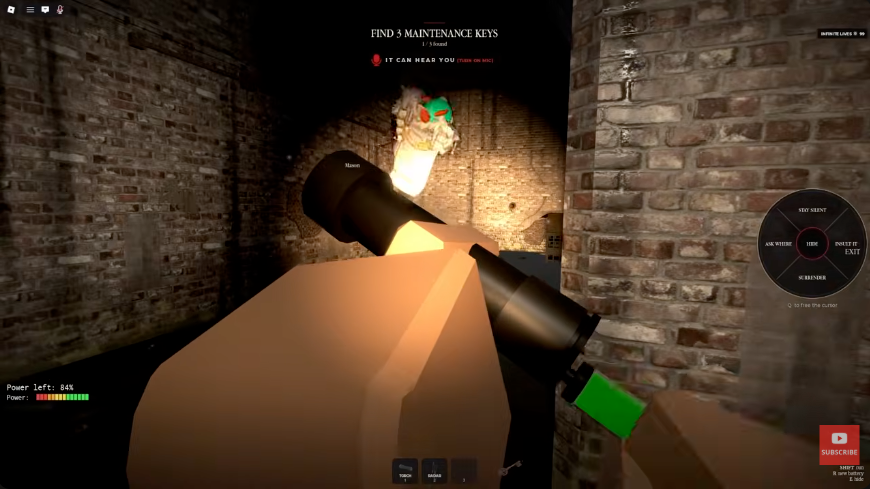
The green battery held in-hand moments before the swap (frame from ItsChalls’ run, YouTube gv1kpa8em0A, ~1:50).
What one swap verifies: batteries exist, they are inserted with R (matching the on-screen control prompt), and one insertion restores most of the Power left bar. What it does not verify yet: battery spawn points and rarity, whether the radar shares the same supply (one reference loadout prompts “Find batteries to power the radar (1/3)” — see the maintenance keys guide), stack limits, and what happens at 0% power.
What Do Code Papers Do in Chase Mode?
Code papers are the four paper notes hidden around the Scrow stage, and they are the only confirmed collectible in the game. Each note shows its slot - “3RD DIGIT” was readable on camera - and a single circled digit; the HUD stacks the digits as you collect, and four notes make the four-digit exit password.
The flow, exactly as the HUD presents it in October 2026 runs:
- The stage objective reads “Find the password to exit 1/4” with the standing warning “Don’t make any noise.”
- Four paper notes are scattered around the mall-style map, each showing its digit slot and one circled digit.
- The HUD assembles the password at the top of the screen, with blanks for notes still missing (one run showed 7_04 at three of four).
- Collect all four and the objective flips to “The exit is in the loading bay”.
- Take the assembled password to the loading bay and escape.
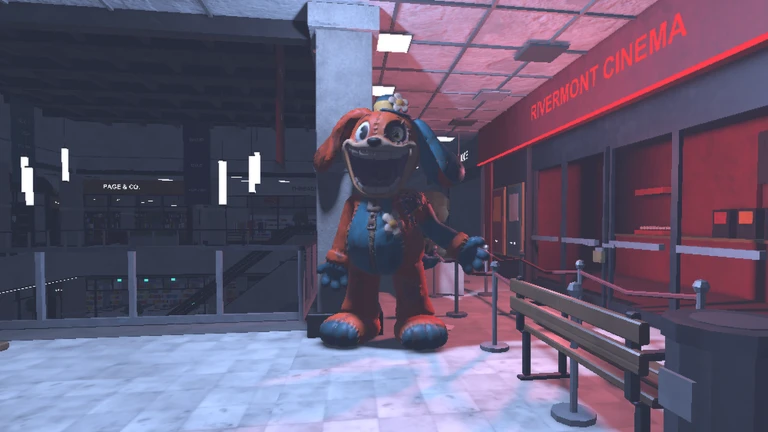
Image: official THRESHOLD media from the game’s Roblox page (developer Reskioat), captured October 5, 2026.
The password itself is random every run - four runs captured in October 2026 footage produced four different passwords - so there is nothing to memorize. What actually kills you in this stage is noise, not the puzzle; the full warning list and per-run password table live in our codes and Scrow passwords page, and the key hunt that comes first is mapped in the maintenance keys guide.
Full Chase Mode run - all 3 maintenance keys, the code paper hunt and the escape, no commentary
Are Code Papers the Same Thing as the Scrow Password?
Same system, two names. The code papers are the collectibles: four paper notes on hotbar slot 2. Scrow is the stage they belong to, named after the NPC who talks to you there before selling you out. The four digits the papers carry assemble into the exit password - there is no separate code beyond what the papers spell.
| Term | What it refers to | Confirmed? |
|---|---|---|
| Code papers | The four paper notes; each carries one digit of the exit password | Yes - HUD and footage, October 2026 |
| Scrow | The stage’s NPC - “this place is safe. I promise.” - and the stage itself | Yes - on-screen text in footage |
| Scrow password | The assembled four-digit exit code (e.g. 5044 in one recorded run) | Yes - four runs, four different codes |
| “P3” | A label some player-made lists use for this step; we found no official or video source using it | No - treated as community shorthand, not game terminology |
Why we separate the item from the stage
While you are in Scrow’s stage, remember what makes it dangerous: it is a voice phase too. The dialogue wheel offers lines like ASK FOR THE CODE and I’M SCARED, and saying the wrong words out loud is fatal by the game’s own description - the words to avoid are cataloged in the forbidden words guide.
Is There a Camera Item in THRESHOLD?
No camera item is confirmed. The only “camera” the official page mentions is the Camera: Not Supported feature listing - that is Roblox’s device-camera input option, the same row that says Voice Chat is not supported, not an in-game item. We found no pickup, no hotbar icon, and no footage of any photo camera during the October 2026 checks.
Which Item Questions Are Still Open?
More than we would like, and we would rather show them than paper over them. Every open question below needs an in-game check or a clearer source before it moves out of the open list - if you have footage that answers one, it directly improves the page.
The open item list, as of October 5, 2026
- Does a camera item exist? What does hotbar slot 3 hold, if anything?
- What happens to the torch at zero power (the lowest verified reading is 17%)?
- Battery spawn points, rarity, and whether the radar shares the same supply.
- Whether code paper spawn points come from a fixed pool of locations.
- Whether the reworked Episode 1 includes its own paper-collection step.
- Whether any paid store pass grants an item (the store tab could not be checked while logged out).
Reference footage for everything above - a full Story + Chase run where the hotbar, power bar and code papers are all visible (chapters: 0:00 Story, 13:31 Chase):

THRESHOLD full walkthrough - Story & Chase Mode (TheKacperosEN, YouTube)
Where Should You Go Next?
The items are the toolkit; the modes are the test. Start with the beginner guide if you have not picked a mode, then take the full Chase Mode walkthrough to watch one complete run. The badges guide lists what a win is worth, and the Episode 1 walkthrough covers the story side.
Related Articles
Guides
THRESHOLD Codes Not Working? Why Nothing Redeems in Roblox THRESHOLD
Typed a THRESHOLD code and nothing happened? There is no redemption system in the game - here is what to check, where rewards come from, and which lists are fake.
OpenGuides
THRESHOLD Roblox Controls - Every Keybind Verified On Screen
Every THRESHOLD control read from on-screen prompts: Z crouch, E hide, Q speech wheel, R battery, B flashlight, SHIFT run, plus the Roblox default movement scheme.
OpenGuides
THRESHOLD DESPAIR Ending Explained - the Episode 1 Finale
What the red DESPAIR card at the end of THRESHOLD Episode 1 means, how the capture cutscene plays out, and what stays open while Episode 1 sits closed for rework.
OpenWas this helpful?
Thanks for the feedback!