
THRESHOLD Roblox Chase Mode Guide - How the Voice Mechanic Works
How Chase Mode works in THRESHOLD on Roblox: the mic mechanic, the 3-key objective, what happens when the entity hears you, and how to beat a ~20% clear rate.
FAQ
Does Chase Mode in THRESHOLD require Roblox Voice Chat?
How many maintenance keys are there in Chase Mode?
What is the Chase Mode clear rate?
Can you play Chase Mode solo, or do you need friends?
What happens if you say the wrong words in Chase Mode?
What Is Chase Mode in THRESHOLD?
Chase Mode is the second of THRESHOLD’s two modes - a round-based escape run, separate from the Episode 1 story. Each round drops you into the maintenance tunnels to find 3 maintenance keys and reach the exit, while an entity that hears your real microphone stalks the corridors. Runs are short: a clean run takes eight to nine minutes.
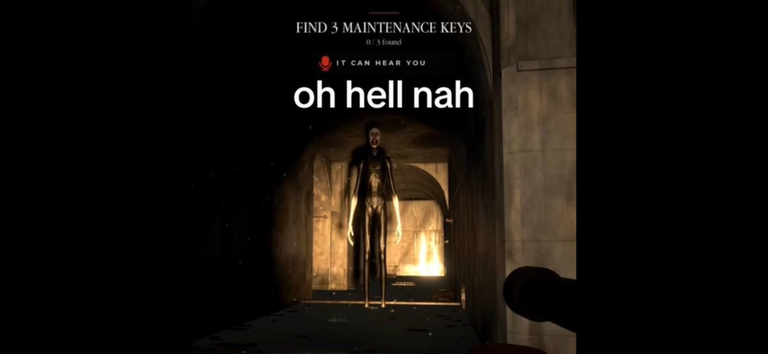
Image: official Chase Mode media from the game’s Roblox page (developer Reskioat).
| Chase Mode at a glance | Detail |
|---|---|
| Mode type | Round-based escape run, separate from Episode 1 [STORY] |
| Objective | Find 3 maintenance keys, then escape |
| HUD progress | “FIND 3 MAINTENANCE KEYS - 0 / 3 found” counter |
| Core rule | The entity hears your real microphone (“IT CAN HEAR YOU” warning) |
| Typical full run | About 8-9 minutes in a no-commentary walkthrough |
| Clear rate | About 20% of players hold the win badge (see below) |
| Server size | Up to 45 players per server |
| Current version | UPD 1.5, BETA - game page updated October 5, 2026 |
Both modes share the same game client: you finish the story episode first or jump straight into a chase lobby. If you are deciding where to start, our beginner guide compares the two modes and walks through microphone setup.
How Does the Voice Mechanic Work?
The voice mechanic is the rule that defines the mode: the entity hears your real microphone. The official description says it plainly - “(It can hear your voice)” - and official screenshots show the HUD warning IT CAN HEAR YOU next to a mic icon. Speak, and it can find you; say the wrong words, and you die.
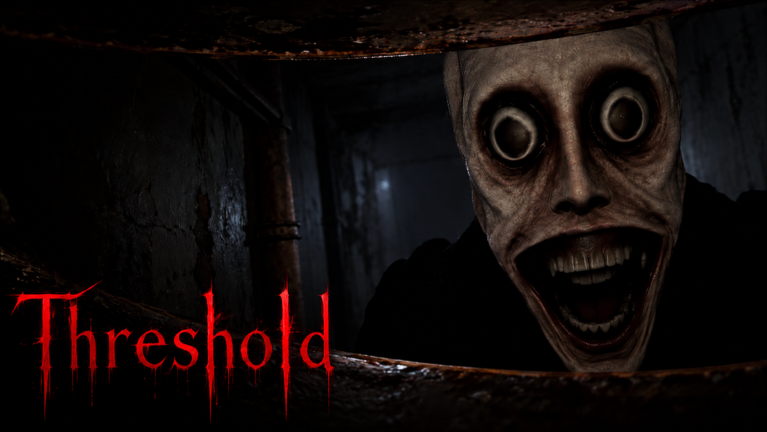
Image: official game media from the game’s Roblox page (developer Reskioat).
It is not Roblox Voice Chat
Two official signals triangulate nicely here. The game page lists Voice Chat: not supported (Camera: not supported as well), while the official description promises an entity that hears your voice. The hearing does not run on Roblox’s platform Voice Chat feature - there is no voice-chat toggle or age verification involved. What matters is your microphone input inside the experience: if your mic picks it up while you play, the entity can hear it.
That is also why the mode works for players who never touched Roblox voice chat, and why the practical skill is microphone discipline rather than comms discipline. Setup details - permissions, devices, and what to check before your first run - are covered step by step in the beginner guide.
The entity reacts to what you say
The mode’s biggest draw, and the reason its biggest videos are titled the way they are: the entity does not just hear you, it responds. Bugzby’s session - “THE ENTITY REPLIES TO YOUR VC!?” - sits above 330,000 views, FadeUnchanged’s “IT CAN HEAR YOUR VC…” above 150,000, and smaller channels echo the same pattern. In group lobbies this turns social: the developer’s own promotional clips lean into snitching on your friends, and the comment sections under the big videos read exactly like that - everyone ratting everyone out.

THE ENTITY REPLIES TO YOUR VC!? - Bugzby's THRESHOLD session
What Happens When the Entity Hears You?
Hearing you is how the entity finds you. Creator recordings and the official description agree on the escalation: sound and speech draw the entity toward your position, it can answer back, and the wrong words kill you outright - “dying in chase mode because you said the wrong words out loud,” in the game’s own words. Silence keeps it blind.
| Stage | What happens | Source |
|---|---|---|
| 1. It listens | Your microphone is monitored while you play; the HUD shows the IT CAN HEAR YOU mic warning | Official description + official Chase Mode screenshot |
| 2. It locates | Sounds and spoken words draw the entity toward the player who made them | Creator recordings: “If you Speak it FINDS you” (Drummity), “THEY LISTEN TO YOUR MIC TO FIND YOU” (chaiyabruce) |
| 3. It hunts | Once it has found you the chase is on; the wrong words kill outright | Official description; chase deaths are the mode’s signature fail state |
The practical reading of that chain: every sound you make is information the entity can spend on finding you, and certain words are instant losses. Group lobbies multiply the problem because anyone’s mouth can feed the entity - your friends’ noise counts too, and their screaming during a chase is exactly the kind of audio the mode is built to punish.
Open questions we will not guess at
How Hard Is Chase Mode?
Chase Mode is genuinely hard: only about 1 in 5 players ever hold the win badge. Dividing Roblox’s official badge counters - 774,860 “Won Chase mode” awards against 3,822,583 “Played Chase Mode” awards - gives a clear rate of roughly 20% as of October 5, 2026. Yesterday’s ratio was harsher still: about 15%.
| Roblox badge API, checked October 5, 2026 | All-time awards | Past-day awards |
|---|---|---|
| Played Chase Mode | 3,822,583 | 751,594 |
| Won Chase mode | 774,860 | 114,774 |
| Clear rate (won / played) | ~20.3% | ~15.3% |
For an escape game, that is a steep gate: roughly four of every five players who try the mode have never escaped. The upside is cost - runs are short, so a failed attempt is a few minutes of tension, not an evening lost. Most players should expect a string of deaths before the first clear, and the deaths are where the route knowledge in the next section comes from.
How Do You Survive Chase Mode?
Survival in Chase Mode comes from three habits: keep your microphone quiet by default, learn the key route before you need it, and never experiment with spoken words mid-run. The clear rate sits near 20%, but runs only cost about eight minutes - most deaths are recoverable knowledge, not lost progress.
| Survival habit | Why it works | Where to go deeper |
|---|---|---|
| Default to silence; treat your mic as always open | The entity hearing your voice is the mode’s core rule, not a punishment you can see coming | Mic setup in the beginner guide |
| Track the 0 / 3 keys counter | The HUD shows key progress at a glance, so you always know how much run is left | The run structure, step by step |
| Learn the route before chasing speed | A clean full run takes 8-9 minutes; route knowledge beats blind sprinting through the tunnels | Full-run video embedded below |
| Never test words in a live run | The wrong words are fatal by the game’s own description - testing them is the most expensive mistake in the mode | - |
| Manage noise when you must talk | Anything your microphone picks up is sound the entity can use to find you; cut the input before real-world conversations | - |
The loop that works: watch one full no-commentary run to learn the key order and the escape, then practice it quiet. Speedrunners race the mode in under a minute once they know it, which tells you how much of the difficulty is knowledge rather than reflex - the entity punishes noise, not movement.
Full Chase Mode run - all 3 maintenance keys and the escape, no commentary
One last note on rewards: the official description asks players to like the game and join the group for rewards - the only reward channels the game advertises today.
Related Articles
Badges
THRESHOLD Roblox Badges - All 5 Badges & How to Unlock Them
All 5 THRESHOLD Roblox badges with official award counts (October 5, 2026) and how to unlock each: Story Mode, Episode 1 [DESPAIR], Chase Mode and more.
OpenGuides
THRESHOLD Roblox Beginner Guide - Modes, Mic Setup & First Run Survival
New to THRESHOLD on Roblox? Pick your first mode, set up your microphone without Voice Chat, and learn the controls and survival basics that keep you alive.
OpenGuides
THRESHOLD Roblox Episode 2 - Official Sneak Peeks, News & Release Clues
All official THRESHOLD Roblox Episode 2 clues so far: the dev's TikTok sneak peeks, the Play as the Viral Monster teaser, and where the release date will land first.
OpenWas this helpful?
Thanks for the feedback!