
THRESHOLD Roblox Beginner Guide - Modes, Mic Setup & First Run Survival
New to THRESHOLD on Roblox? Pick your first mode, set up your microphone without Voice Chat, and learn the controls and survival basics that keep you alive.
FAQ
Do you need Roblox Voice Chat to play THRESHOLD?
Which mode should a beginner play first?
Is THRESHOLD on Roblox suitable for kids?
Can you play THRESHOLD without a microphone?
How many players fit in one THRESHOLD server?
What Kind of Game Is THRESHOLD?
THRESHOLD is a survival-horror escape game on Roblox by developer Reskioat (fezystudios), released in August 2026 and currently in BETA (UPD 1.5). It pairs an action story episode with a signature Chase Mode where the entity listens to your voice — and saying the wrong words out loud gets you killed. The official page rates the experience Moderate for both horror and violence.
The game’s own description is the best one-paragraph pitch, quoted verbatim from the official page on October 5, 2026:
[BETA] bugs will be expected. Episode 1 [STORY] AND Chase Mode is NOW OUT! (It can hear YOU) Enjoy an action-filled story, and dying in chase mode because you said the wrong words out loud.
Like the game and join the group for rewards!
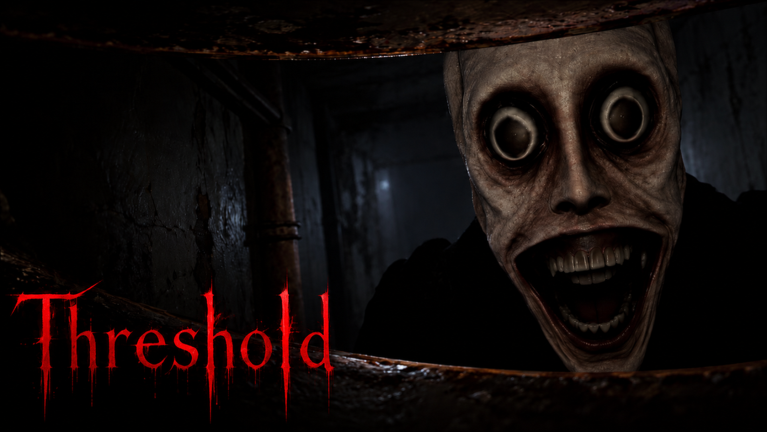
Image source: official THRESHOLD game page on Roblox (roblox.com/games/78453398695059), October 5, 2026.
| Fact | Value (official page, Oct 5, 2026) |
|---|---|
| Developer | Reskioat / fezystudios |
| Released | August 9, 2026 |
| Current version | UPD 1.5 (BETA) |
| Genre | Survival / Escape |
| Server size | 45 players |
| Rating | ~98% positive (146.0K likes / 3.4K dislikes) |
| Visits | 10.8M+ |
| Active at review time | ~13,000 players |
| Voice Chat | Not Supported |
| Camera | Not Supported |
Episode 1 (Story) or Chase Mode — Which Should You Play First?
Start with Episode 1 [STORY]. The official description frames it as the on-ramp — “Enjoy an action-filled story” — before Chase Mode’s voice-death loop, and the story teaches you how the entity behaves at a slower pace. Switch to Chase Mode once you can crouch, hide, and read the HUD without thinking.
The two modes share one universe and one rule — the entity hears you — but they play very differently:
| Episode 1 [STORY] | Chase Mode | |
|---|---|---|
| Official pitch | “Enjoy an action-filled story” | “die in chase mode because you said the wrong words out loud” |
| Your goal | Follow Episode 1’s story scenes to the escape | Find 3 maintenance keys, then find the exit password and escape |
| Voice mechanic | The entity “can hear YOU” (official description) | Red HUD banner: “IT CAN HEAR YOU (TURN ON MIC)” |
| Completion badge | Finished Episode 1 [DESPAIR] | Won Chase mode |
| Time in reference footage | ~13.5 minutes | ~16 minutes to escape |
The survival loop is broken down step by step in the Chase Mode guide.
The official badge stats (October 5, 2026) show how far most players get:
| Badge | Rarity label on the official page | Won ever |
|---|---|---|
| Welcome to THRESHOLD! | 100.0% (Freebie) | 4,931,403 |
| Played Story Mode | 0.0% (Impossible) | 885,422 |
| Finished Episode 1 [DESPAIR] | 0.0% (Impossible) | 275,480 |
The Chase Mode pair tells the same story in numbers: since both badges were added on September 21, 2026, “Played Chase Mode” has been awarded about 3.82M times against roughly 775K “Won Chase mode” awards — about one win per five starts. Every badge and its unlock condition is listed in our badges guide.
Once Episode 2 becomes a thing, we will track it separately — see the Episode 2 news tracker.
How Do You Set Up Your Microphone Without Roblox Voice Chat?
THRESHOLD listens to your real microphone in Chase Mode, but it does not use Roblox Voice Chat — the official page lists Voice Chat as Not Supported. You only need a working mic and permission granted when Roblox asks. In-game, the Chase HUD reminds you constantly: IT CAN HEAR YOU (TURN ON MIC).
That “Not Supported” label confuses new players, so here is the distinction: Roblox Voice Chat is the platform’s opt-in spatial voice feature (the one with age verification). THRESHOLD does not use it — the page says so. The game’s own microphone mechanic is a separate horror feature: the entity listens for what you say during chases. Both facts come straight from the official page on the same day.
Set your mic up in about two minutes:
- Skip Voice Chat enrollment entirely. No ID verification, no spatial voice settings — the game does not use them.
- Play on a device with a working microphone (laptop mic, headset, or phone mic all work).
- Allow microphone access when Roblox asks. In a browser it is the padlock/mic icon in the address bar; in the Roblox app it is the OS permission prompt.
- If you denied access earlier, re-enable the microphone permission for Roblox (or your browser) in your device’s privacy settings, then reload the game.
- Watch the red banner in Chase Mode. When “IT CAN HEAR YOU (TURN ON MIC)” is on screen, the voice mechanic is part of the mode — that is your cue that words matter.
No microphone at all? Gameplay footage shows a speech wheel — hold Q to free the cursor and pick a set line like HIDE, I’M HIDING, ASK WHERE, CRY, EXIT, or CHALLENGE. The wheel’s options change as the entity talks to you (we recorded variations like “CAN YOU HEAR?”, “TELL ME A STORY”, and “ARE YOU GONNA HURT ME?”). Whether every chase encounter is completable with your mic muted is something footage alone cannot prove, so if you want the full experience, turn the mic on.
The mechanics behind the words that get you killed are dissected in the Chase Mode voice-mechanic guide.
Reference footage — a full Story + Chase run (chapters: 0:00 Story, 13:31 Chase):

THRESHOLD full walkthrough - Story & Chase Mode (TheKacperosEN, YouTube)
Which Controls Do You Actually Need on Your First Run?
THRESHOLD has no official controls documentation, so treat Roblox’s standard scheme as your baseline and learn the three keys the game itself prints on screen: Z to crouch, E to hide, and Q to free the cursor for the speech wheel. Everything else is Roblox default — WASD, Space, and mouse.
Every keybind below that is not Roblox standard was read directly from the game’s own on-screen prompts in October 2026 gameplay footage:
| Input | Action | Source |
|---|---|---|
| WASD / arrow keys | Move | Roblox standard scheme |
| Space | Jump | Roblox standard scheme |
| Mouse | Look / camera | Roblox standard scheme |
| Z | Crouch — “Press Z to crouch - hide behind things” | On-screen prompt (footage) |
| E | Hide — “E hide” hint near hiding spots | On-screen prompt (footage) |
| Q | Free the cursor for the speech wheel — “Q. to free the cursor” | On-screen prompt (footage) |
| 1–3 | Hotbar slots: 1 = Torch, 2 = Paper | Hotbar labels (footage) |
Reading the rest of the HUD (lives, power, items)
Three more HUD elements you will see in every Chase Mode screenshot:
- “INFINITE LIVES ⊙ 50” (top right) — a lives counter; the reference footage shows it reading ⊙ 50. What changes it is not documented anywhere official, so treat dying as cheap but not free.
- “Power left: 90%” (bottom left) — a colored power bar that drains while you play. It was at 90% about twenty seconds before it read 84% in the same footage, so it moves fast enough to plan around.
- The hotbar — slot 1 is your Torch (your light source, tied to the power bar), slot 2 is Paper (the code papers you assemble for the exit password), slot 3 sits empty.
How Do You Survive Your First Chase Mode Run?
Your first Chase Mode run is about noise discipline, not speed. The HUD tells you exactly what to do — find 3 maintenance keys, keep your torch powered, and answer the entity carefully when it talks. Stay quiet, hide behind things rather than running blind, and treat every “this place is safe” promise as a trap.
The run structure, as shown by the HUD in October 2026 footage:
- Find 3 maintenance keys — the objective banner tracks “0 / 3 found” as you go.
- Find the exit password — later in the run the HUD switches to “Find the password to exit 1/4” with digit slots, and the screen warns “Don’t make any noise.”
- Escape — reach the exit once you have the password together.
And the rules that keep you alive while you do it:
- Do not say the trigger words. The official description’s whole warning — “dying in chase mode because you said the wrong words out loud” — is about this.
- Answer the speech wheel deliberately. The entity interrogates you (“Tell me where your friend is, and you might live” appears in footage). Picking HIDE versus CHALLENGE is a decision, not flavor text.
- Crouch and hide instead of panicking. Z to crouch behind things, E to hide — the game prints both hints at the moments they matter.
- Watch your power. Your torch drains; a dark corridor with a dead torch is where runs end.
- When the screen turns red, run. The alert “SCROW GAVE YOU AWAY — Run - she is coming for you” fires when the friendly-seeming NPC sells you out. She says “this place is safe. I promise.” first. Do not believe it.
Expect to die a lot in BETA — the badge numbers above say most runs end badly, and that is normal. Learn one rule per run: words first, keys second, password third.
Related Articles
Badges
THRESHOLD Roblox Badges - All 5 Badges & How to Unlock Them
All 5 THRESHOLD Roblox badges with official award counts (October 5, 2026) and how to unlock each: Story Mode, Episode 1 [DESPAIR], Chase Mode and more.
OpenGuides
THRESHOLD Roblox Chase Mode Guide - How the Voice Mechanic Works
How Chase Mode works in THRESHOLD on Roblox: the mic mechanic, the 3-key objective, what happens when the entity hears you, and how to beat a ~20% clear rate.
OpenGuides
THRESHOLD Roblox Episode 2 - Official Sneak Peeks, News & Release Clues
All official THRESHOLD Roblox Episode 2 clues so far: the dev's TikTok sneak peeks, the Play as the Viral Monster teaser, and where the release date will land first.
OpenWas this helpful?
Thanks for the feedback!